
To make payments through Batch, stores will select the invoices they want to pay, the credits they want to apply, and then transfer a single combined payment to Batch for all their vendors.
After receiving payment from the store, Batch allocates your payment and remittance details to all your publishers.
Payment Process
Go to the Current Summary
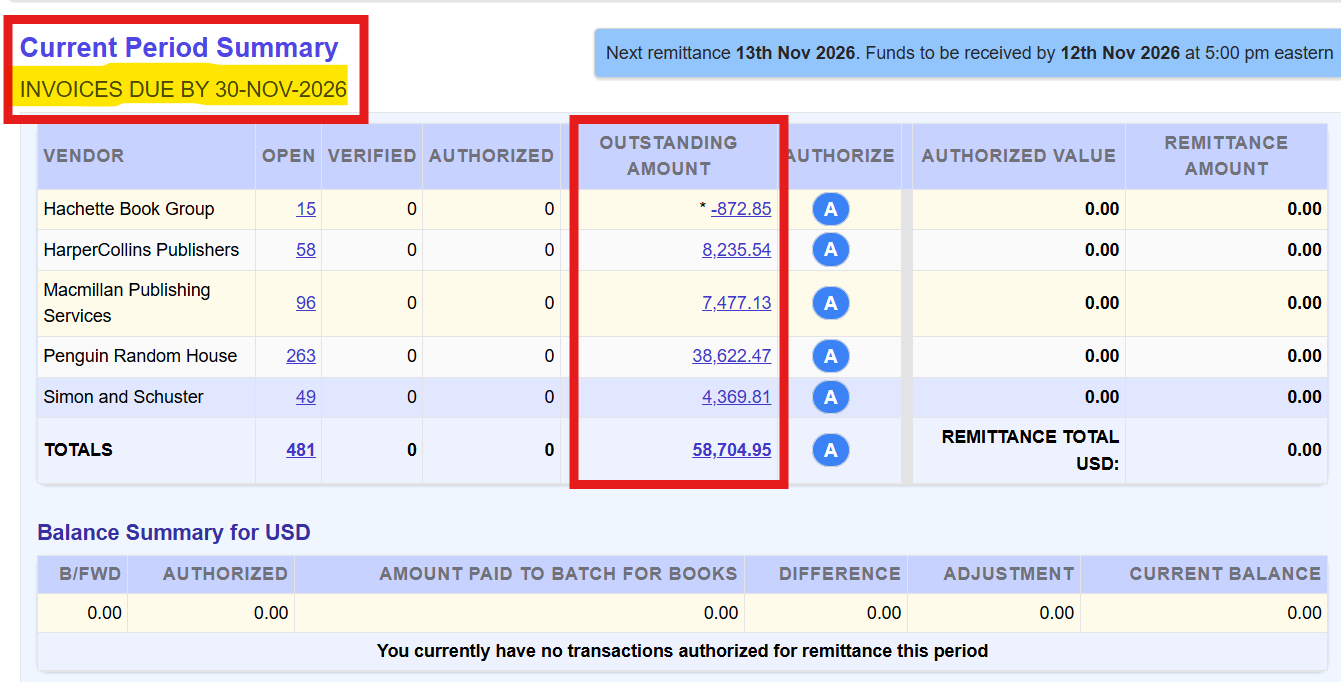
The Current Summary shows what is due to each publisher by the end of the month. The outstanding amount shown includes invoices due by the end of the month and all available credits.
The Current Summary is the first screen users see upon launching their Batch portals. Stores can also navigate to the Current Summary through the Period Summaries dropdown in the yellow menu bar.
Authorize Invoices and Credits
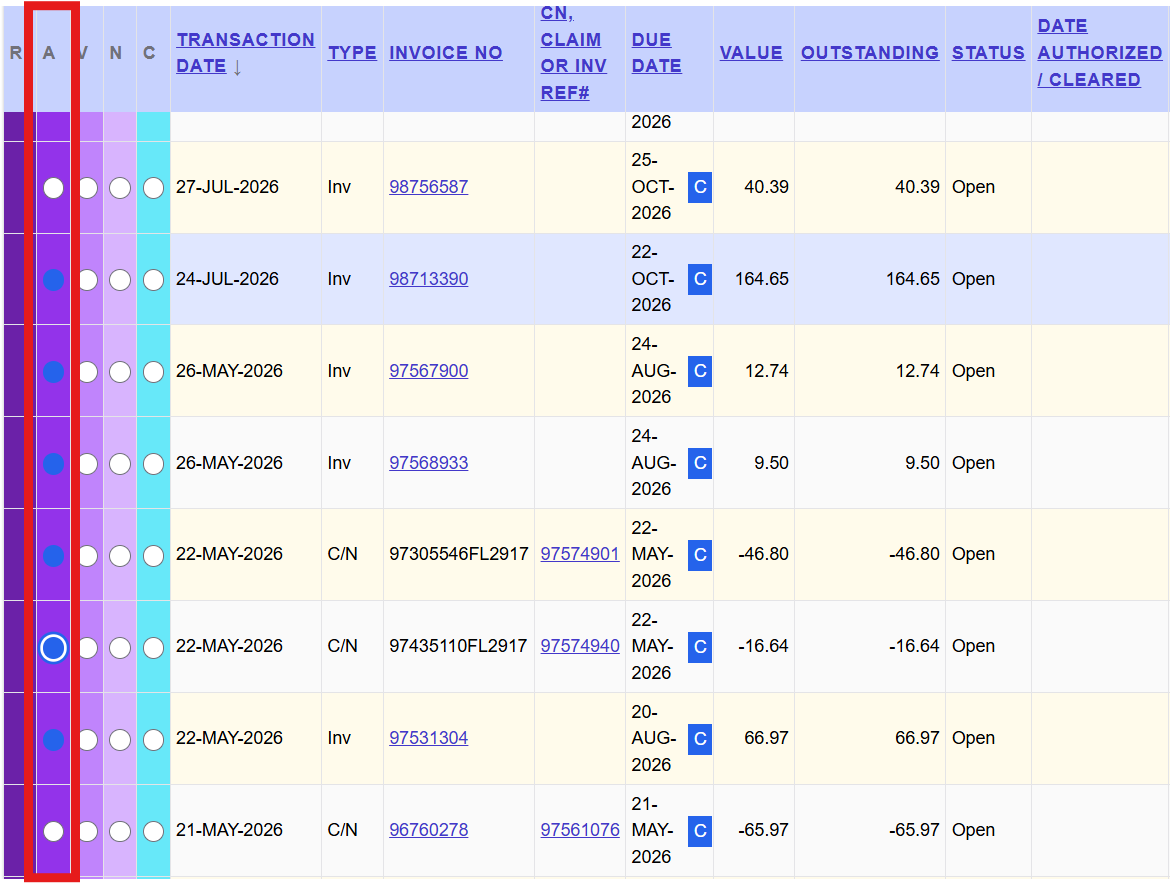
The next step is to Authorize all the invoices and credits you want to include in your payment.
Drill down into each vendor by clicking on the numbers in the summary screen, which will bring up a list of invoices and credits. Authorize the invoices and credits by checking the ‘A’ status update button on the transaction screen.
Click the green Status Update button after you’ve made all your selections.

Find your payment total
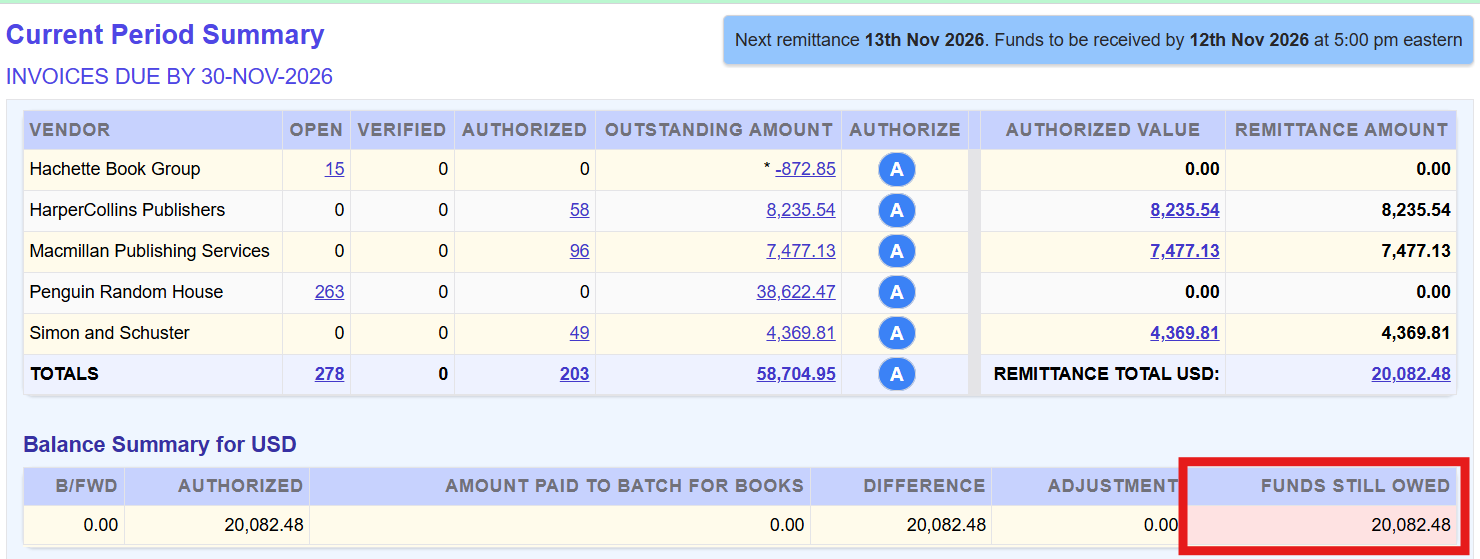
After you’ve authorized invoices and credits, return to the Current Summary screen and locate your total payment amount. This will be in the Funds Still Owed field of the Balance Summary table located beneath the publisher summary
Transfer funds to Batch
Transfer your payment to Batch for Books by ACH or wire transfer using these bank account details:
Bank Name: M&T
Account Name: Batch for Books Inc
Account Number: 9887664507
Routing Number: 022000046
Batch cannot accept or process checks or credit card payments. All payments must be electronically transferred to Batch.
Stores will transfer funds into Batch’s bank account so you do not need to ever provide Batch your bank account information.
This step happens outside of Batch. Stores typically go through their bank or a service like Melio Payments, QuickBooks, Bill.com, Square, etc.
What happens next?
Batch pays your Publishers
After we receive your payment, we will allocate it to each of your vendors based on your authorized amounts and provide them with all the remittance details necessary for them to accurately post your payment.
We will then update the status of all invoices and credits included in the remittance to Cleared and they will no longer be part of the Current Summary.
Batch Payment Schedule
Batch sends payments and remittance details to vendors every Friday morning and on the last business day of the month. We will include any payment that has been deposited into Batch’s bank account by 6 pm Eastern the evening before the payment date.
Payment History
Stores can view their payment history by date in two places on Batch:
Period Summaries Past Remittances
Reports Past Payment Status
Commonly asked questions about payments
How do I know if the publisher has received our payment
If the authorized amount has been cleared and the remittance is listed in Past Remittances or the Past Payment Status report, that means that Batch has delivered your payment and remittance advice to each of your vendors.
On a transaction-basis, if the status of an invoice or credit is Cleared, then the publisher has received payment for that invoice or credit. If the status of an invoice or credit is Open, Verified, or Authorized, that transaction is still Outstanding and has not been paid.
How does Batch determine what invoices to pay?
Batch does not dictate what invoices get paid to the publisher. Stores will determine what invoices and credits get paid by authorizing them on Batch. Batch will only remit invoices and credits that have been authorized by a Batch user.
How do I apply my outstanding credits?
To use credits, stores must authorize them. Authorized totals on Batch take into consideration any credits that have been authorized.
Can I pay part of an invoice or use part of a credit?
Stores must always pay the full amount of the invoice and use the entire amount of the credit when paying through Batch for Books.
When do publishers receive payments from Batch?
Batch sends publisher payments and remittance information every Friday morning, plus the last business day of the month. Any payment received by Batch the night before the payment date will be included so long as Batch has enough funds to cover all authorized invoices.
How do I submit my payment to Batch?
Stores will transfer funds to Batch via ACH or wire transfer. Transferring funds does not happen directly on your Batch portal. Typically, this will be done through a store’s financial institution or a service like QuickBooks or Melio payments.
Can I submit payment by check or credit card?
Stores must electronically transfer funds to Batch by ACH or wire transfer. Credit card and check payments cannot be processed by Batch.
Do I have to send a separate payment for each vendor?
Stores only need to send one combined payment for each vendor and Batch will allocate that payment to each publisher based on your authorized amounts. The Current Summary screen will display authorized amounts for each vendor and show your combined payment total in the Funds Still Owed field.
My bank cannot send funds by ACH and/or they charge an extra fee to send funds by ACH. Can I still use Batch?
Yes! Stores whose banks are unable to send payments by ACH have some alternatives. The most popular alternatives are Melio Payments and QuickBooks Payments, though stores have used other services like Bill.com, Shopify, Square, etc.
Batch is agnostic as to the mechanism used to transfer funds; our only stipulation is that the payment needs to be electronically deposited into our account.
How do I pay future-due invoices?
Batch will only include invoices that are part of the current period in payments to the publishers. To include a future-due invoice, stores must move that invoice to the current period.
My outstanding amount is a negative amount. Will Batch include those transactions in the publisher payments if I authorize those transactions?
A negative amount means that the value of the credits exceeds the value of the invoices. Batch cannot remit a negative amount to the publishers. If your authorized amount is negative, you will see a red flag and the remittance amount will be 0.00, indicating that publisher won’t be included in the remittance.
Warning! A negative outstanding amount does not mean that you have no invoices due to the publisher.
Can I send Batch a lump sum payment and keep an open balance?
Stores can send funds to Batch at any point and for any amount, even if no invoices have been authorized. Batch will hold onto the funds, and the store will be able to apply the open balance whenever they decide to authorize invoices and credits for payment.
Warning! If Batch does not have enough funds to cover the total authorized amount, no payment will be remitted to any publishers.
What does it mean if there is a Current Balance field instead of a Funds Still Owed field in the Balance Summary.
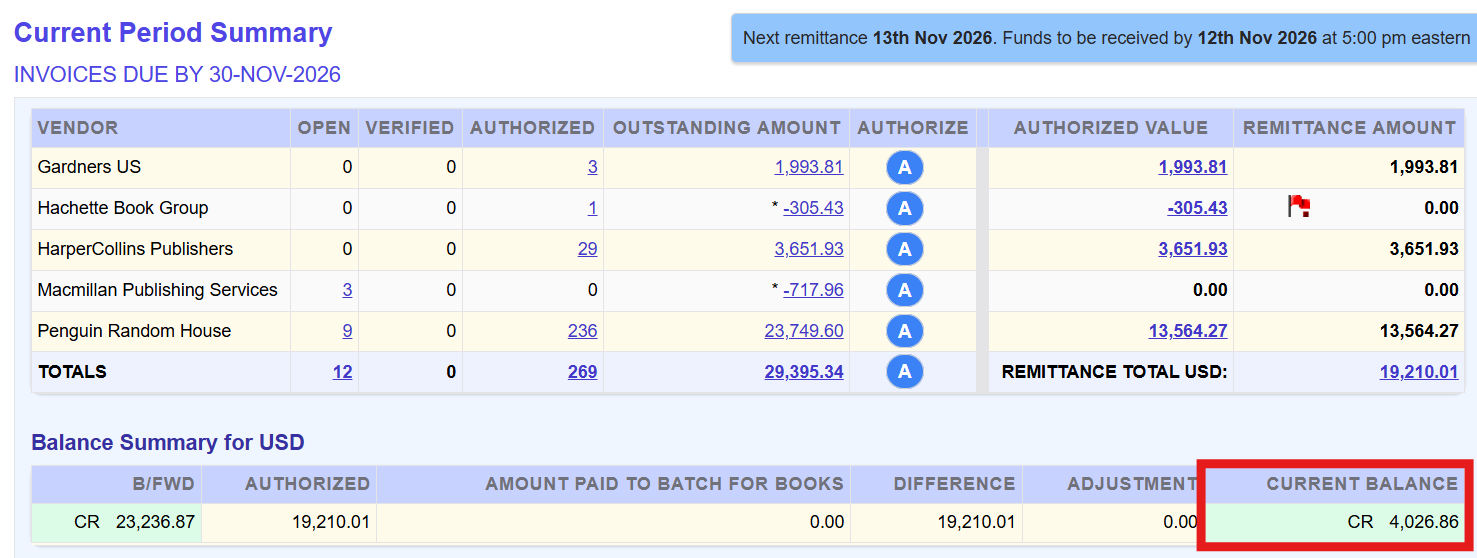
When the far-right field in the balance summary is labeled Current Balance, that means that Batch already has enough funds on hand to cover your authorized invoices and no additional payment is necessary.
The amount following the CR is the extra amount that will still be available on Batch after the payment has been remitted.